Creating HighPoly Beretta in 3DS MAX
Introduction
In This tutorial I will show my way of creating high poly weapon in 3d max.
Step 1
First things first.go to create panel and Create a plane like I show on the image and apply the reference image texture on it.(i found this beretta image on google)

Step 2
After select that plane, right click on it , object options and untic “show frozen in gray” now you can frizz that object. create a new plane
on top of the plane like I show on the image and add a little opacity to it and convert it to editable poly, since making a gun look real is
important, the good scope for 30-30 is an important part of a gun, so modelling this part is essential for a good model.

Step 3
Now we will expend the polygons. by selecting the edges and holding shift and draging them you can create new polygons like I show on the image.

Step 4
Then start to expend other adges and then you should weld the verteces that need to be welded by selecting target weld in the vertex option.

Step 5
I Finish the top part of the gun like I show on the image

Step 6
Now using weld and expending polygons make edges deaper

Step 7
The lest part of the modeling will bee edge thikening. create a extra edges like I show on the image along the edges that have to be more sharp. and when it comes to 90 degreas edges create 2 edges along like I show on the image

Step 8
Here we go top part is done. Just add symetry modefier and turbosmooth

Step 9
Now lets create a canon part. Just create a cylinder like I show on the image

Step 10
Now convert it in to a editable poly and using scale and shift and move and shift create a whole inside the canon.

Step 11
You should have something like that

Step 12
Once agayne you will need to thicken the edges of the canon to make it more smooth

Step 13
I added a little more details to the top part and I cut off a circle for the canon so you can see the canon inside

Step 14
Now using extrude create a liitle part on the back of the top

Step 15
Now using exacly same tecniques just create the bottom part.

Step 16
Once agayne make the edges cylindrecal like on the image

Step 17
This how it should look like when you finish

Step 18
To create a trigger I just used a box and shaped it by deviding polygons and moving them around

Step 19
Here is how my moddel look like after adding little parts on the gun (turbo smooth off)

Step 20
Now to create a hole in that part of the gun simply create a cylinder like I show on the image

Step 21
Then devide the polygons on the cylinder like I show on the image

Step 22
Then select the the gun part agane go to create panel and crate a boolean and select the cylinder as object B

Step 23
You whould get something like that

Step 24
Now using cut tool simply add edges to evoyd glitching polygons like I show on the image

Step 25
Once agayne create some more details to the gun

Step 26
On this image you can see all the different objects I created fot this gun using very techniques I showed you befour

Step 27
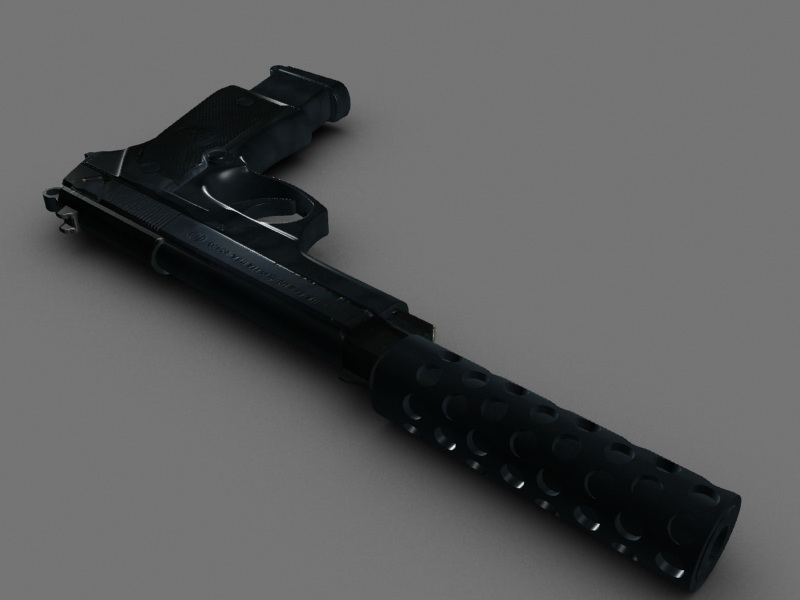
And here how the render of the gun looks so far

Step 28
I thought of making the gun more cool by adding the silencer and a bigger bulete cartrege. so to make a sylencer create a cylinder like I show on the image

Step 29
Once again make a cylinders going trough it and use a boolian to make wholes inside

Step 30
Now I created the cylinder inside the cylinder like I show on the image

Step 31
I also expended the size of the cartrege

Step 32
Not to create the txture you can make it the proper way bot for this tutorial I showed how to do it the easy way. simply use your reference image as a texture by ading Unwrap UV’s on the seperete parts of your gun and alieng them like I show on the image

Step 32
You should get something like that wehen you finish. now do the same thing to evry single part of the gun

Finish
So after you will add some more details you should achieve something like that

I hope that you leaned alot in this tutorial. you can use those techniques for modeling any kind of guns.
 About the Author
My name is Alex Jerjomin. I’m originally from Russia but at the moment I live in UK. Every since I both my first video game I always wanted to create my own game designs and my own characters. so since 14 years old I’m leaning 3d max and other 3d applications. Now I’m 20. Starting my 3d Educations in Hertfordshire University next year and hoping to work in game industry.

Copyright © Aleksandrs Jerjomins (Exclusive Publisher)
Edit by Stryker
Source: http://www.3dm3.com


About The Author

You might be interested in